

Authentication
Gaining OAuth 2.0 Credentials
In order to make API calls, you must first register your application (after logging in with your DeviantArt account).
During registration you will choose a client type:
- Confidential — server-side applications that can securely store a secret. You will receive both a
client_idand aclient_secret. - Public — browser-based (SPA) or native/mobile applications that cannot protect a secret. You will receive only a
client_id. Authentication relies on PKCE instead of a client secret.
You can manage your applications on the Applications page.
Relevant specifications:
- RFC 6749 — The OAuth 2.0 Authorization Framework
- RFC 6750 — The OAuth 2.0 Bearer Token Usage
- RFC 7636 — Proof Key for Code Exchange (PKCE)
- OAuth 2.1 Authorization Framework (draft)
OAuth 2.1 and OAuth 2.0
All newly registered applications use OAuth 2.1, which incorporates security best practices from RFC 7636 (PKCE) and the OAuth 2.0 Security Best Current Practice (RFC 9700). Existing applications continue to operate under OAuth 2.0 rules and can be upgraded to OAuth 2.1 at any time from the Applications page.
The key differences for OAuth 2.1 applications are:
- PKCE is required for all Authorization Code flows (S256 method only).
- The Implicit grant (
response_type=token) is not available. Use Authorization Code with PKCE instead. - Redirect URIs must match exactly (no path-prefix matching).
- Bearer tokens must be sent via the
Authorizationheader or POST body — query string tokens are rejected. - Public clients authenticate with PKCE alone and do not require a
client_secret.
OAuth2 Basics
The API supports the following grant types:
- Authorization Code (with PKCE) — gives your app access to a user's account. This is the recommended grant type for all applications.
- Client Credentials — gives your app access to public endpoints that do not require user authorization.
Endpoints document their required authentication method in the Authentication section of the endpoint documentation.
Authorization Code (with PKCE)
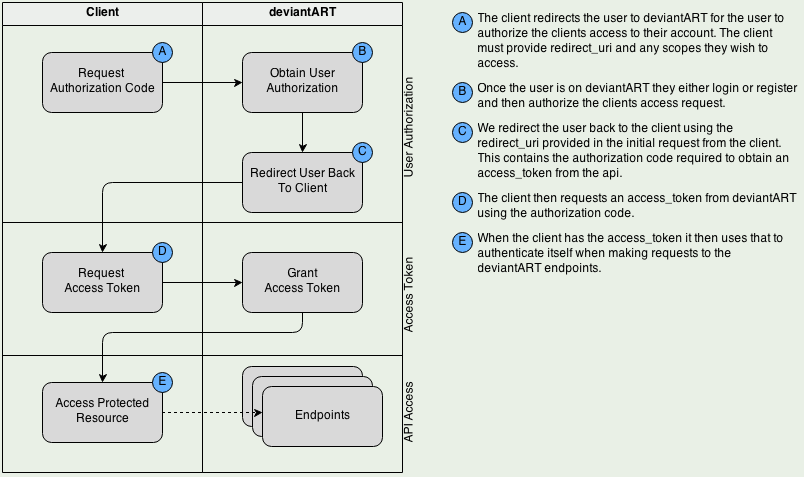
The Authorization Code grant is the standard OAuth 2 grant type and gives your app access to aspects of a user's account. For OAuth 2.1 applications, PKCE is mandatory. For legacy OAuth 2.0 applications, PKCE is optional but strongly recommended.
An overview of the authentication flow is illustrated below:
Client Credentials
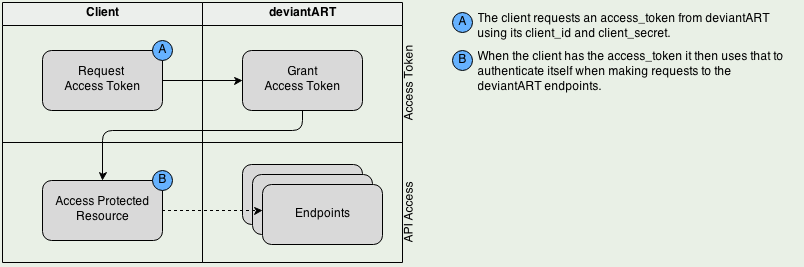
The Client Credentials grant gives your app access to "public" endpoints and does not require user authorization. An overview of the authentication flow is illustrated below:
Proof Key for Code Exchange (PKCE)
PKCE (RFC 7636) prevents authorization code interception attacks and is the mechanism that allows public clients to use the Authorization Code grant securely without a client secret.
The PKCE flow works as follows:
- Your application generates a random string called the
code_verifier(43–128 characters, using[A-Z] / [a-z] / [0-9] / - . _ ~). - Compute the
code_challengeasBASE64URL(SHA256(code_verifier)). - Include
code_challengeandcode_challenge_method=S256when redirecting the user to the authorization endpoint. - When exchanging the authorization code for a token at the token endpoint, include the original
code_verifier. The server will verify it matches the previously submitted challenge.
OAuth 2.1 applications must use the S256 challenge method. The plain method is not permitted.
Client Types
OAuth distinguishes between two client types based on their ability to keep credentials confidential (RFC 6749 §2.1):
| Type | Description |
|---|---|
| Confidential | Server-side applications that can securely store a client_secret. These clients authenticate at the token endpoint using both client_id and client_secret (via POST body or HTTP Basic Authentication). |
| Public | Browser-based (single-page), mobile, or desktop applications that cannot protect a secret. These clients authenticate at the token endpoint using only client_id together with PKCE. No client_secret is required. |
Using The Authorization Code Grant
User Authorization
Before making API calls for a user, you must ask that user to authorize your application. First you should redirect the user to DeviantArt's authorization URL along with the required query-string parameters below.
https://www.deviantart.com/oauth2/authorizeParameters
| Method | Name | Type | Required | Description |
|---|---|---|---|---|
| GET | response_type | string | required | Setting response_type to code is required. Doing so will include the authorization code in the response. Valid values: code. |
| GET | client_id | integer | required | Your app's client_id (obtained during app registration). |
| GET | redirect_uri | string | required | Your app's URI which the user should be redirected to after authorizing. This redirect_uri MUST be in your app's redirect URI whitelist; non-whitelisted URIs will be rejected. |
| GET | scope | string | optional | The scope you wish to access (space separated). Defaults to basic. |
| GET | state | string | optional | state will be sent back as part of the redirect_uri query parameters. This should be a unique identifier you create to verify the redirect is coming from your original request. See RFC 6749 §10.12. |
| GET | code_challenge | string | required (OAuth 2.1) | The PKCE code challenge, computed as BASE64URL(SHA256(code_verifier)). Required for OAuth 2.1 applications; optional (but recommended) for legacy OAuth 2.0 applications. See RFC 7636 §4.2. |
| GET | code_challenge_method | string | required (OAuth 2.1) | Must be S256. See RFC 7636 §4.3. Valid values: S256. |
| GET | view | string | optional | Force authentication view if user is logged out. login is the only valid value. |
Successful Response
A successful response means that the user will be redirected to your whitelisted URI along with the following GET parameters:
| Method | Name | Type | Description |
|---|---|---|---|
| GET | code | string | The code will be returned to you on successful authorization. You can then use this to obtain the access_token. |
| GET | state | string (optional) | If you included the state parameter in your initial redirect request, that value will be returned to you in this field. |
Unsuccessful Response
If the authorization request fails for any reason, the user will be redirected back to your whitelisted URI along with the following GET parameters:
| Method | Name | Type | Description |
|---|---|---|---|
| GET | error | string | The error code for the error as defined by the specification. See RFC 6749 §4.1.2.1. |
| GET | error_description | string | The description of the error. |
Please read the error documentation for detailed error handling guidelines.
Example Authorization Redirect
OAuth 2.1 (with PKCE):
GET https://www.deviantart.com/oauth2/authorize?response_type=code&client_id=0&redirect_uri=https://myapp.example/cb&scope=basic&state=mysessionid&code_challenge=E9Melhoa2OwvFrEMTJguCHaoeK1t8URWbuGJSstw-cM&code_challenge_method=S256Legacy OAuth 2.0 (without PKCE):
GET https://www.deviantart.com/oauth2/authorize?response_type=code&client_id=0&redirect_uri=http://myapp.example/cb&scope=basic&state=mysessionidGetting A User Access Token
Once you have the code from the authorization step, you can then request an access_token to gain access to the API resources. You do this by sending a POST request to the /token endpoint.
https://www.deviantart.com/oauth2/tokenParameters
| Method | Name | Type | Required | Description |
|---|---|---|---|---|
| POST | client_id | integer | required | Your app's client_id (obtained during app registration). Confidential clients may alternatively provide client_id and client_secret via HTTP Basic Authentication. |
| POST | client_secret | string | required (confidential clients) | Your app's client_secret (obtained during app registration). Not required for public clients, which authenticate via PKCE instead. |
| POST | grant_type | string | required | The value must be authorization_code unless you are refreshing a token (see Refreshing An Access Token). |
| POST | code | string | required | The code from the authorization step. |
| POST | redirect_uri | string | required | The redirect_uri sent with the authorization request to obtain the code. This must exactly match the value sent in that request. Required when grant_type is authorization_code. |
| POST | code_verifier | string | required (OAuth 2.1) | The original PKCE code verifier string (43–128 characters). The server computes BASE64URL(SHA256(code_verifier)) and compares it to the code_challenge sent during authorization. Required for OAuth 2.1 applications; required for OAuth 2.0 applications if code_challenge was included in the authorization request. See RFC 7636 §4.5. |
Successful Example (Confidential Client)
A successful token request will return a Bearer token in JSON format. See RFC 6750.
Request ===>
curl https://www.deviantart.com/oauth2/token \
  -d grant_type=authorization_code \
  -d client_id=0 \
  -d client_secret=mysecret \
  -d redirect_uri=https://myapp.example/cb \
  -d code=1234 \
  -d code_verifier=dBjftJeZ4CVP-mB92K27uhbUJU1p1r_wW1gFWFOEjXk
Response <===
{
  "expires_in": 3600,
  "status": "success",
  "access_token": "Alph4num3r1ct0k3nv4lu3",
  "token_type": "Bearer",
  "refresh_token": "3ul4vn3k0tc1r3mun4hplA",
  "scope": "basic"
}
Successful Example (Public Client)
Public clients omit client_secret and rely on PKCE for proof of possession.
Request ===>
curl https://www.deviantart.com/oauth2/token \
  -d grant_type=authorization_code \
  -d client_id=0 \
  -d redirect_uri=https://myapp.example/cb \
  -d code=1234 \
  -d code_verifier=dBjftJeZ4CVP-mB92K27uhbUJU1p1r_wW1gFWFOEjXk
Response <===
{
  "expires_in": 3600,
  "status": "success",
  "access_token": "Alph4num3r1ct0k3nv4lu3",
  "token_type": "Bearer",
  "refresh_token": "3ul4vn3k0tc1r3mun4hplA",
  "scope": "basic"
}
Unsuccessful Example
Request ===>
curl https://www.deviantart.com/oauth2/token \
  -d grant_type=authorization_code \
  -d client_id=0 \
  -d client_secret=mysecret \
  -d redirect_uri=https://myapp.example/cb \
  -d code=0
Response <===
{
  "error": "invalid_request",
  "error_description": "Incorrect authorization code."
}
Please read the error documentation for detailed error handling guidelines.
Refreshing An Access Token
All access_tokens expire after one hour. After expiration you either need to re-authorize the app or refresh your access token using the refresh_token from the /token request.
The refresh_token will expire after 3 months. After that time you must re-authorize the app.
Parameters
| Method | Name | Type | Required | Description |
|---|---|---|---|---|
| POST | client_id | integer | required | Your app's client_id (obtained during app registration). Confidential clients may alternatively provide credentials via HTTP Basic Authentication. |
| POST | client_secret | string | required (confidential clients) | Your app's client_secret (obtained during app registration). Not required for public clients. |
| POST | grant_type | string | required | The value must be refresh_token. |
| POST | refresh_token | string | required | The refresh_token of the Bearer token. |
Example Token Refresh
Request ===>
curl https://www.deviantart.com/oauth2/token \
  -d grant_type=refresh_token \
  -d client_id=0 \
  -d client_secret=mysecret \
  -d refresh_token="3ul4vn3k0tc1r3mun4hplA"
Response <===
{
  "expires_in": 3600,
  "status": "success",
  "access_token": "Alph4num3r1ct0k3nv4lu3",
  "token_type": "Bearer",
  "refresh_token": "3ul4vn3k0tc1r3mun4hplA",
  "scope": "basic"
}
Using The Client Credentials Grant
Getting A Client Access Token
To obtain a client access token, you simply request a token using your client's client_id and client_secret.
Parameters
| Method | Name | Type | Required | Description |
|---|---|---|---|---|
| POST, GET | client_id | integer | required | Your app's client_id (obtained during app registration). client_id and client_secret can be provided via HTTP Basic Authentication. See RFC 6750 §2.1. |
| POST, GET | client_secret | string | required | Your app's client_secret (obtained during app registration). client_id and client_secret can be provided via HTTP Basic Authentication. See RFC 6750 §2.1. |
| POST, GET | grant_type | string | required | The value must be client_credentials. |
Successful Example
A successful token request will return a Bearer token in JSON format. See RFC 6750.
Request ===>
curl https://www.deviantart.com/oauth2/token \
  -d grant_type=client_credentials \
  -d client_id=0 \
  -d client_secret=mysecret
Response <===
{
  "expires_in": 3600,
  "status": "success",
  "access_token": "Alph4num3r1ct0k3nv4lu3",
  "token_type": "Bearer"
}
Unsuccessful Example
Request ===>
curl https://www.deviantart.com/oauth2/token \
  -d grant_type=client_credentials \
  -d client_id=0 \
  -d client_secret=mybadsecret
Response <===
{
  "error": "invalid_client",
  "error_description": "Client authentication failed."
}
Please read the error documentation for detailed error handling guidelines.
Using The Implicit Grant
Deprecated. The Implicit grant (
response_type=token) is not available to new applications. It is retained only for legacy OAuth 2.0 clients that were registered with implicit access before the introduction of OAuth 2.1. New applications should use the Authorization Code grant with PKCE, which is secure for both public and confidential clients.If you have an existing application that uses the Implicit grant, you can upgrade it to OAuth 2.1 from the Applications page. The OAuth 2.1 specification omits the Implicit grant entirely due to its known security vulnerabilities.
Getting Authorization And Access Token (Legacy Only)
To obtain an access_token using the implicit grant you redirect the user to the authorization URL and the access_token will be returned to your client in the fragment of the redirect_uri you provided.
Note that to use the implicit grant you must configure your client's grant_type in the client settings. Implicit clients also require HTTPS redirect URIs and whitelisted URIs must exactly match.
https://www.deviantart.com/oauth2/authorizeParameters
| Method | Name | Type | Required | Description |
|---|---|---|---|---|
| GET | response_type | string | required | Setting response_type to token is required. Doing so will include the access_token in the response. Valid values: token. |
| GET | client_id | integer | required | Your app's client_id (obtained during app registration). |
| GET | redirect_uri | string | required | Your app's URI which the user should be redirected to after authorizing. This redirect_uri MUST be in your app's redirect URI whitelist; non-whitelisted URIs will be rejected. |
| GET | state | string | required | state will be sent back as part of the redirect_uri query parameters. This should be a unique identifier you create to verify the redirect is coming from your original request. See RFC 6749 §10.12. |
| GET | scope | string | optional | The scope you wish to access (space separated). Defaults to basic. |
Successful Example
A successful authorization will redirect the user back to the client with the access_token in the fragment of the URL.
Request ===>
GET https://www.deviantart.com/oauth2/authorize?response_type=token&client_id=0&redirect_uri=https://myapp.example/cb&scope=basic&state=mysessionidResponse <===
GET https://myapp.example/cb#access_token=Alph4num3r1ct0k3nv4lu3&token_type=bearer&expires_in=3600&scope=basic&state=mysessionidUnsuccessful Example
Request ===>
GET https://www.deviantart.com/oauth2/authorize?response_type=token&client_id=-1&redirect_uri=https://myapp.example/cb&scope=basic&state=mysessionidResponse <===
GET https://myapp.example/cb?error=invalid_request&error_description=Invalid+client.&state=mysessionidPlacebo Call
The first and most basic authenticated API call. It checks that a given access_token is still valid. The endpoint is:
https://www.deviantart.com/api/v1/oauth2/placeboExample
Request ===>
curl https://www.deviantart.com/api/v1/oauth2/placebo -d access_token=Alph4num3r1ct0k3nv4lu3Response <===
{
  "status": "success"
}
Notes
This call is most useful for checking that an access_token is still valid before making another API call that might take a long time (like a file upload). This way, if a token has expired, your users won't have to wait until the upload (or any other long-running API call) returns an error before your app notices and makes a /token call to refresh the expired token.
Revoking Access / Logging Out
Sometimes the user may want to log out or revoke access to the application. In these situations the application may choose to revoke access by itself. Note that if the application provides a means to log out, you should implement this call.
To manually revoke access you can provide either an access_token or refresh_token to identify the user and revoke your application's access to their account. This will revoke all access tokens, refresh tokens and authorizations, meaning applications would need to restart the authorization process to obtain account access again.
The default revoke removes all tokens for the user. If you want to just revoke a single device/session you can pass revoke_refresh_only=true. This will just revoke the refresh_token that is sent in with the revoke request.
POST https://www.deviantart.com/oauth2/revokeExample
Request ===>
curl https://www.deviantart.com/oauth2/revoke -d token=Alph4num3r1ct0k3nv4lu3Response <===
{
  "success": true
}
Updated 5 months ago